SoundMagic Spectral: real-time spectral plugins for audio transformation
User Documentation & Information
Michael Norris
New Zealand School of Music—Te Kōkī
Te Herenga Waka —Victoria University of Wellington
michael.norris@vuw.ac.nz • http://www.michaelnorris.info/software/soundmagic-spectral
Introduction
SoundMagic Spectral is a suite of freeware Audio Unit plug-ins that offer exotic real-time spectral processing effects, along with a few time-domain effects. This document explains the theory behind spectral processing and details each plug-in in the suite.
What is spectral processing?
Time domain vs. frequency domain processing
A time domain representation of sound is one in which only the instantaneous changes in sound pressure are displayed, recorded or manipulated. The audio file contains a stream of numbers that represent how far from equilibrium the sensor in the microphone was at that point, or how far from equilibrium the speaker cone should be driven (and thus how far from atmospheric sound pressure levels the instantaneous sound pressure will be at that point).
This can be seen in the image below (x-axis = time, y-axis = displacement from equilibrium)
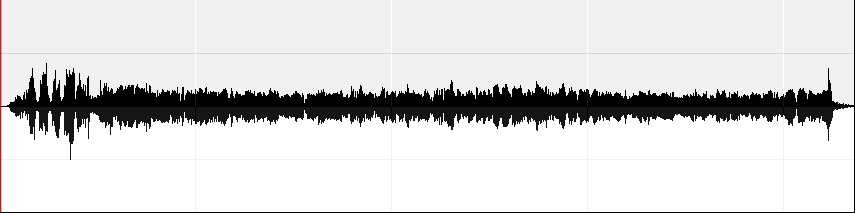
A time-domain representation of a soundwave
Time domain representations then only tell us about the overall amplitude changes in the sound. It tells us little about the exact frequency content of the sound, other than some vague ideas about pitch or noise content that we might gauge by judging the overall randomness of the waveform. Indeed, it is hard to tell from this picture just what the sound actually is.
In the second image, however, we see the same sound converted to a frequency domain representation (also called a spectral representation):
(x-axis = time, y-axis = frequency (0-Nyquist), darkness = amplitude)
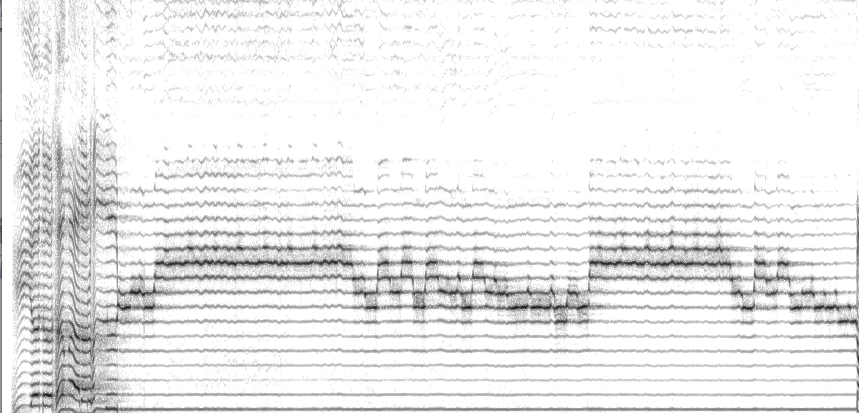
A frequency-domain representation of a soundwave
Here the raw sound data has been converted into a series of frequencies and amplitudes. The frequencies range from bass frequencies at the bottom of the graphic to the highest sounds we can hear at the top of the graphic; the amplitudes are represented by the darkness of these component frequencies. In the soundfile represented above, we can see that while the overtones of the spectrum remain constant in frequency, different harmonics are being highlighted. (Indeed, this soundfile is a recording of Tuvan throat singing, and the spectrogram above graphically shows how the throatsinger can create a melodic line even without changing the fundamental frequency of his vocal cords.) This sort of information could not be seen at all in the time-domain representation.
The main difference, then, between a time-domain process and a frequency-domain (spectral) process is that spectral processes have two extra steps involved in the processing of audio: spectral conversion and reconversion. Firstly, the effect converts the raw sound data into a spectral representation — a series of numbers representing the strength of the frequency components within the sound at various points. Then, after processing the spectral data in some manner, it converts the spectral representation back to a time-domain representation (sound file format). In order for a spectral effect to operate in real time, this conversion and reconversion must happen on the order of 150 to 200 times a second for a typical configuration. Thankfully there is an algorithm called the Fast Fourier Transform (FFT) that can manage this, and since the early 2000s, hardware-optimized FFTs have been available on home computers.
Spectral bins and FFT sizes
In order to understand how these effects work, it**s useful to have a little bit of behind the scenes understanding. The FFT algorithm spits out a frequency-domain representation of the input audio in the form of a large set of frequency bands (called bins), equally spaced across the spectrum from 0Hz up to the Nyquist limit (half the sampling rate). You can choose the number of bins that you want in the FFT, but, for computational reasons, it must be a power of 2 (e.g. 1024, 2048, etc). In choosing the FFT size, however, there is a tradeoff between the amount of frequency data that can be captured (the higher, the better) and the time accuracy upon resynthesis (the smaller, the better). So if the detail in the sound is important, then smaller FFT sizes are better. But if you want more accuracy in frequency, then choose larger FFT sizes. Sometimes there just is no perfect setting, although, if you can use audio with higher sampling rates than 44.1kHz, you might find this trade-off less problematic.
- Once the FFT has converted the time domain data into the frequency domain, the particular DSP effect is then given a series of frequencies and amplitudes that represent the strength of various frequency components (for instance, harmonics) present within the sound at a given time. The job of a spectral process is to now do something with those frequencies and amplitudes to radically alter the spectral makeup of a sound. There are many, many clever things we can do with them, and the SoundMagic Spectral effects are just a start, but Im sure there are many more than have been thought of so far. In many ways, spectral processing is still in its infancy.**\
A guide to the Soundmagic Spectral project
The SoundMagic Spectral project builds on the ideas implemented in the SoundMagic plug-in suite that I started in 1995 for the now discontinued OS 9 application SoundMaker. SoundMagic Spectral brings not only effects familiar from the SoundMagic suite to Mac OS X through the standard plug-in format called Audio Units, but furthermore adds many new features unthinkable in SoundMaker: real-time processing, G4/G5/Intel-optimized FFT and phase vocoder routines and even more exotic and creative effects than in the original suite.
The concepts behind the SoundMagic algorithms owe much to the work of previous composers and programmers — most notably Trevor Wishart in his book Audible Design (a must-read for those using DSP) based upon his work with the Composers Desktop Project (www.composersdesktop.com)
Downloading and installing
These effects may be downloaded with an eternal beta status (i.e. limited support) from the main SoundMagic Spectral page.
Bugs
If you get crashes or other unexpected behaviour with these effects, dont assume I already know about them. For the good of all users, please inform me about them (my email is in the next paragraph). Whats really useful is if you can reproduce the bug after a particular sequence of events. A crash log is also very handy. When an OS X native application crashes, a file is created in the User**s ~/Library/Logs/CrashReporter/ directory. You should open the log of whichever application you were using SoundMagic in, and copy and paste the contents to me in an email.
Licence & support
The current set of plug-ins is considered beta software. Its entirely possible that the effects contain some lingering bugs/quirks, though hopefully Ive ironed most of them out. They are offered as freeware, so please download them, use them and spread the word. While I am open to, and interested in, suggestions for new effects and new parameters for existing effects, I can**t guarantee immediate satisfaction of your request. I do have a working to-do list, so email through any bugs/suggestions to me at michael.norris@vuw.ac.nz.
Latency
Because these effects use large chunks of sound, there is often significant latency, usually of about half a second, sometimes longer, between the input and output. This means that its a good idea to ensure there is at least a seconds worth of silence at the end of your sound file, to allow for the processing tail.
Phase randomization
The optimized phase vocoder routines in these effects do not perform the usual phase unwrapping stage that is typically seen in most phase vocoder implementations. The reason is that it is computationally expensive, and for most processes is actually redundant. By removing it, I have made about a 10–15% saving in CPU utilization of these effects. The downside is that when you apply certain procedures such as interpolation to the amplitudes, you tend to get a ringing effect, which sounds like a comb filter with a fundamental frequency derived from the size of the FFT. To combat this, a simple trick is to randomize the phases of each component, which removes this ringing effect, as the phases no longer coincide at each FFT period. However, this also removes the temporal accuracy of phase components, tending to smear the sound, especially for larger FFT sizes., and also widens the stereo field. On the plus side, this can be actually quite sonically desirable for many applications, and so you will often see this option selected by default.
Spectral clichés
Its very easy with these effects to end up with spectral soup (sine tones running up and down the spectrum). While this might be fun, its also a spectral cliché, and best avoided. The expressive power of these effects is in their more subtle manipulations of timbre. Often the most rewarding effects are found when you move a parameter just slightly away from its normal position. Also, try putting a couple of these effects in series for even more possibilities!
THE EFFECTS
I have categorized the effects in SoundMagic Spectral below by their typical function or application. I have divided them into the following categories:
- Spectral Smoothing Effects
- Spectral Sustaining Effects
- Spectral Excitement Effects
- Spectral Pitch Effects
- Spectral Filtering Effects
- Spectral Texturizing Effects
- Spectral Partial Effects
- Time Domain Effects
Common Parameters
-
Brightness
Applies a filter to either increase or decrease the strength of higher-frequency components. At its most aggressive, the upper frequency components can sizzle quite audibly. -
Lo bin cutoff
Frequency components lower than a certain frequency are removed (set to zero amplitude) -
Hi bin cutoff
Frequency components higher than a certain frequency are removed (set to zero) -
Randomize phases
The phase information is randomized (see **Phase Randomization" section above) -
FFT size
The larger the FFT size, the smoother the result, but also the more CPU is used in performing the FFT. On G5s, this probably isn**t an issue, but on G4s, going too high can cause the audio to break up as the CPU maxes out. -
Gain
The output level of the effect. Some accumulation effects can create clipping in the audio — reducing the gain will avoid this. -
Feedback
The amount with which the output of the effect is fed back into the input -
Parameter Variance
Some effects allow you to alter a parameter in a programmatic way, through the notion of variance. This lets you connect one parameter to either the amplitude of the sound, the inverse of the amplitude, a Low Frequency Oscillator (LFO) or to a random change.
Spectral Smoothing Effects
The effects in this category tend to blur, smooth or otherwise slow down the rate of spectral change. The net result is that one can create strange hybrid sounds, or drones that are still based on the sonic characteristics of the original.
SPECTRAL AVERAGING
Averages the spectral information over n windows. Very similar effect to Spectral Blurring.
- Number of Frames
The number of FFT frames over which to average. The more frames the smoother the result.
SPECTRAL BLURRING
Applies a low-pass filter to the spectral changes from one window to the next, progressively smearing the sound. Has similar spurious problems as Spectral Averaging, but may still be useful.
- Blur amount
The amount of smearing that takes place. This can be varied using the variance controls detailed above
SPECTRAL DRONEMAKER
Spectral DroneMaker is the king of spectral drone effects. It can turn any sound into a beautiful, slowly-changing drone based on the sonic characteristics of the underlying sound. The idea came from the software called Mammut developed by Øyvind Hammer of Notam, which used very large FFTs tosmear out the detail, thus creating slowly changing drones. Unlike Mammut, Spectral DroneMaker still uses normal-sized FFTs, instead creating the drone by gradually interpolating between frequency components sampled at a distance. Other parameters for making the drone even more sexy include a bank of comb filters added prior to the interpolation for a subtle, or not-so-subtle pitched effect, the ability to gate frequency components as in Spectral Tracing, and the ability to add a flanger to the output.
-
Interpolation length
Each bin is interpolated between samples taken at a distance. This parameter sets the amount of time that the bins are sampled at. -
Interp length variance
The above parameter can be randomized within a range of interp length ± variance -
Use peak amplitudes
With this switched on, the process will scan for the highest amplitude that occurs in each bin the input file while they are being interpolated. The process will then use that stored amplitude instead of the actual value that occurs at the next interpolation point in the input file. -
Gate level
Only lets partials above a certain threshold into the output sound. -
Comb filterbank level
Spectral DroneMaker allows you to harmonize the input sound by putting it through a comb filterbank. This parameter sets the wet/dry level of the comb filtering. -
Comb filter fundamental
Sets the fundamental frequency of the filterbank. The filters are built up from this frequency. -
Scale type
A list of preset scale types for building the filterbank -
Number of octaves
How many octaves you want the filterbank to cover. The filterbank can be quite computationally expensive with a high number of octaves. -
Filter resonance
The strength of the comb filters. Watch out for distortion from high resonance filters. -
Flanger amount
Lets you apply a time-varying flanger to the output -
Flanger depth
The maximum delay length of the flanger. The higher the number the more intense the pitch-varying aspect of the flanger -
Flanger rate
The speed of the flanger.
SPECTRAL SUSTAINING EFFECTS
These effects in some way sustain partials for a certain duration, using slightly different algorithms to determine when and for how long partials should be sustained for.
SPECTRAL FREEZING
Sometimes also known as Spectral Accumulation. Each bin is watched until its amplitude reaches a peak. It is then held at that peak until it is exceeded by another peak in that bin. The Freeze Factor parameter puts a decay onto the peak holding, so that you don**t just end up with a whole series of very high-amplitude peaks.
-
Freeze Factor
Once a bin is frozen, it can then be decayed. If this is set to 100%, no decaying takes place, allowing for a complete bin freeze, which will only be superseded by a peak. -
Use threshold param
If this is checked, a freeze will only take place if the new peak is above a threshold level. -
Threshold
The threshold above which a freeze can take place -
Zero bins under threshold
If this is checked, unfrozen bins under the threshold level will be zeroed
SPECTRAL GATE AND HOLD
A similar effect to Spectral Freezing, in which each bin is watched until its amplitude exceeds a threshold level. The main difference between this effect and Spectral Freezing, is that a bin is frozen for a specific length of time, rather than until it is exceeded by a higher amplitude. In Spectral Gate and Hold, once a bin is frozen, it can have an amplitude envelope applied to it (indicated by the Fade in Length, Hold length, Hold variance and Fade Out Length parameters). During that time there is the possibility of an optional decay (indicated by the Decay factor parameter).
-
Threshold
The level above which a bin will be frozen -
Threshold brightness
This parameter alters the threshold level over the range of the spectrum. A high brightness setting indicates a threshold that gets progressively lower as you go up the spectrum. Zero is the default. -
Fade in length
The length of time to fade in a frozen bin for -
Hold length
The length of time to hold a frozen bin for (after the fade in length) -
Hold variance
The hold duration parameter can be randomized on a per-bin basis within a range of hold duration ± var -
Fade out length
The length of time to fade out a frozen bin for -
Decay factor
The amount that the frozen bin is decayed by over its lifetime. 100% = no decay, 0% = instantaneous decay -
Bin shift (& bin shift var)
The number of bins to shift the sustained portion of sound. Can be useful for distorting or disguising the nature of the original sound. -
Delay vs. freq
Can delay the onset of a frozen bin depending on its frequency. With a setting below 100%, high-frequency components enter first, while lower-frequency components enter later; with a setting above 100%, this is reversed. -
Pulsing rate & var
An amplitude pulse can be applied to held bins to create a shimmering effect. The pulse remains constant over the lifetime of each bin, but the specific frequency of pulsing can be varied from bin to bin. -
Zero partials under threshold
Partial falling under the threshold will be zeroed. If this is checked, then nothing of the original sound will come through, except the frozen bins. -
Normalize held partials
Frozen bins should be set to the same level -
Normalize level
The level to normalize frozen bins to, assuming previous parameter is checked -
Hold silence first
A random silence is created on a per-bin basis at the beginning, so you don**t get all bins triggered at once
SPECTRAL WEAVE
This effect waits until the amplitude of the sound exceeds a threshold, and then further waits until the sound is proven stable enough to be considered a steady-state sound (such as a sustained pitch). Once this state has been reached, a snapshot of the entire spectrum (called a thread) is saved into one of the effect**s buffers. These threads are then faded in and out (weaved), in a wave-like fashion, creating an undulating texture of frozen audio from the input file.
-
Threshold
The level above which the effect will start listening for steady-state sound -
Num. threads
The maximum number of spectral snapshots to be maintained in the effect -
Thread life
The length of time a thread should exist for -
Max. stability
The maximum dynamic variation permitted within the sound to constitute a steady state -
Min . stability length
The minimum length of time that the dynamic variation needs to remain within the max.stability threshold to be considered a steady state -
Hold length
The length of each weave of the thread -
Hold length variance
The amount of randomization (+/-) for the hold length -
Fade in out %
The amount of fade in and fade out envelope applied to each weave. 50% means that the first half of the weave will be faded in, then immediately faded out -
Silence length
The amount of silence between each weave -
Silence length var
The amount of randomization (+/-) for the silence length -
Hold out length
The amount of time following the detection of a steady state that the effect stops listening for further steady states (to avoid multiple threads of the same audio input) -
Pulse frequency
A pulsation can be applied to each weave -
Pulse gain
The gain of the troughs of each pulse (peaks are always assumed to be 0dB from the original dynamic of the weave) -
Normalize
Should the effect normalize each thread before weaving? -
Normalize level
If so, what level should it normalize to?
SPECTRAL EXCITEMENT EFFECTS
SPECTRAL SHIMMER
A variety of ways to add shimmer, jitter, sparkle, pulsation or sizzle to your sound.
-
Jitter amount
The percentage of bins that are jittered (a random fluctuation in amplitude) -
Jitter only above
Allows jitter only above a certain frequency -
Low-frequency jitter
The maximum amount of jitter (in dB) at 0Hz -
High-frequency jitter
The maximum amount of jitter (in dB) at the Nyquist limit. The amount of jitter is interpolated between this value and the low-frequency jitter over the range. -
Jitter gate level
Only apply jitter if the bin is above a certain amplitude (a low level here can create a real sizzle in the higher frequencies) -
Jitter hold (windows)
The number of windows for which a jitter is held on a bin — a larger value makes less of a jitter and more of a kind of surging sound -
Amplitude pulse type
Applies an amplitude pulsation wave across the spectrum. Square uses blocks of bins (of size set by the Pulse Width parameter), either of max or min pulse level. Sin uses a sin wave across the spectrum ranging between max & min levels. -
Pulse level max
The maximum amplification of the pulse wave -
Pulse level min
The minimum amplification of the pulse wave -
Pulse width
The number of bins that a pulsation wave is spread across -
Pulse rate
The rate at which the pulsation wave is cycled up or down across the spectrum -
Delay variance
Delays each bin in a programmatic way, creating sweeps up or down or random delay fluctuations. The Delay Variance parameter sets the maximum delay, while the Delay Type parameter sets the particular method by which bins are delayed.
SPECTRAL SHUFFLE
Randomly shuffles blocks of bins around within the spectrum. You have control over the Shuffle factor (the amount of blocks that are shuffled), the Shuffle range (how far away from the original position each block is moved) and the number of bins per block.
-
Shuffle factor
The number of groups that are shuffled, as a percentage of the FFT size. -
Shuffle range
How far away, in bins, each group is moved from its original position. -
Bins per group
The number of bins that are kept together in a block.
SPECTRAL PULSING
A rather experimental effect, that switches bins on and off across the spectrum in a pulsating fashion.
-
On duration
The length of time to keep bin zero switched on -
Off duration
The length of time to keep bin zero switched off (after the on duration) -
On multiplier freq
As you go up the frequency spectrum, multiply the on duration by this number -
Off multiplier freq
As you go up the frequency spectrum, multiply the off duration by this number -
On multiplier time
As you move forward in time, multiply the on duration by this number -
Off multiplier time
As you move forward in time, multiply the off duration by this number -
Min on duration
Set the minimum length for the on duration -
Max on duration
Set the maximum length for the on duration -
Min off duration
Set the minimum length for the off duration -
Max off duration
Set the maximum length for the off duration -
Modulo type
1= ping-pong between min and max; 2 = wrap round from max to min/min to max
SPECTRAL PITCH EFFECTS
SPECTRAL HARMONIZER
The spectrum is transposed up or down by a set series of intervals (you have three to play with) and mixed back into the original. Each interval can then be transposed in a similar manner to the Spectral Filterbank transpositions.
-
Intervals
There are three intervals that you can define to harmonize the original sound file. If, for instance, you define interval 1 to be 400 cents, this will harmonize the sound file up a major third. -
Transposition Type
If the no. partials per interval setting is higher than 1, you can define how the interval will be used to determine the other harmonizations. See Spectral Filterbank for more information on these transpositions -
Transpositions per interval
For each interval, how many transpositions there are. For instance, 4 transpositions of a minor third, with the transposition type set to stacked would give you a diminished seventh chord.
SPECTRAL BIN SHIFT
Shifts the entire spectrum up or down a set number of bins. Because the bins of the FFT are equally-spaced, not logarithmically spaced, the spectrum becomes rather compressed or expanded the further away you get, and as a result, strange, inharmonic spectra result which sound quite distant from the original. Can be useful for then feeding into another effect (e.g. spectral gran, or time stretching)
-
Bins to shift
The number of bins to offset the entire spectrum -
Rotate
Should bins that fall off the end be rotated around to the other side? -
Instantaneous feedback
The bin-shifting is fed back within the same frame (as opposed to normal feedback, in which the output is fed back into the following input frame) -
Num instant feedback
How many times the instantaneous feedback algorithm should be calculated
SPECTRAL PITCH SHIFT
A simple spectral pitch shift up or down by a set amount, using the method suggested by Mark Dolson and Jean Laroche in their paper New Phase-Vocoder Techniques for Real-Time Pitch-Shifting, Chorusing, Harmonizing and Other Exotic Audio Modifications, in which spectral peaks are tracked and shifted independently of one another. You can optionally use a Bins to Shift parameter to shift all the spectral peaks up in an inharmonic manner.
-
Pitch Shift
The amount to shift -
Use Bins to Shift parameter
Instead of using an interval, shift by a set number of bins (this is different from the spectral bin shift, in that it shifts individual peaks by a set number of bins, rather than the entire spectrum) -
Bins to shift
The number of bins to shift, if the above parameter is checked -
Rotate
Should bins that fall off the end be rotated around to the other end?
SPECTRAL STRETCH
An effect to create a variety of inharmonic stretches. Spectral peaks are tracked and shifted by the quadratic equation: βω+αω2, where ω is the frequency of each bin.
-
Alpha stretch
The value for α in the equation above -
Beta stretch
The value for β in the equation above, which can be varied using the beta stretch variance parameter -
Variance type
Allows the β value to be varied automatically (Random = randomly; LFO = sin wave; Link amplitude = amount of variance relates to amplitude of sound; Link inv amp = related inversely to amplitude) -
Variance quantization
While the value of β is being varied, it can be rounded so that the pitch steps up and down, often creating a form of harmonic series. The higher this value, the more stepped the pitch is.
SPECTRAL FILTERING EFFECTS
SPECTRAL TRACING
Typically used to retain only the n loudest bins in a spectrum and remove the others. Alternatively you can retain the n softest bins, or set a threshold level (a gate) below which all partials are zeroed, or above which all partials are zeroed.
-
Tracing type
Choose from eight different algorithms: retain the n loudest, the n softest, bins between a range, bins above the threshold or bins below the threshold; you can also remove the n loudest, softest or between a range. -
Number of bins 1
The number of bins to retain/remove -
Number of bins 2
Used to define the lower end of the range when using one of the two n1 & n2 tracing type settings -
Threshold
The threshold in dB; retains bins above or below this threshold if using one of the last two trancing types
SPECTRAL FILTERBANK
A bank of extremely narrow, very pure bandpass filters (similar to the GRM Reson plug-in). You can choose the interval between centre frequencies of your filterbank, and how many filters should be created. Because of the inaccuracies in pitch in the FFT, the filterbank cannot guarantee the actual frequencies you ask for will be exactly rendered; however, it will be as accurate as possible within the limitations of the FFT.
-
Number of filters
The number of filters in the filterbank -
Base frequency
The lowest frequency in the filterbank, from which the other frequencies are built-up -
Interval
The interval that will be applied to the base frequency and successive harmonics to build up the filterbank, using the techniques described in the transposition type parameter -
Transposition type
-
Stacked: each interval is simply applied to the previous interval, stacking the interval on top of each other. For an interval of 300 cents (a minor third), this would create a diminished seventh chord, for instance. An interval of 200 cents would create a whole-tone scale.
-
Chord: the fundamental and the upper note defined by the interval are simply repeated at the octave. If the fundamental was C, and the interval was a perfect fifth (700 cents), then the notes are just C and G repeated up through the octaves
-
Harmonics: a harmonic series is based on integer multiples of a fundamental (n, 2n, 3n, 4n, etc). The harmonics setting extends this by using multiples of other intervals. It assumes that the standard harmonic series would have an interval setting of 1200 cents (an octave) — therefore, halving this to 600 cents (a tritone) would give you filters at 0.5n, n, 1.5n, 2n, etc..., while 2400 cents (two octaves) would give you 2n, 4n, 6n, 8n, etc.
-
-
Harmonic gain
Harmonic gain indicates how much each progressive harmonic as you get higher should be attenuated by. -
Side bins
Allows you to create a wider filter by adding side bins on either side of the central filter bin. While this lets more of the original sound through, and therefore less pure filtering, it also creates some interesting pulsating dynamic effects -
Side bin gain
How much each side bin is attenuated by as you get further away from the central filter
SPECTRAL GLIDING FILTERS
Creates a series of spectral filters that glide in pitch
-
Number of filters
How many filters are to be created -
Filter width
The size of the filter in bins -
Start frequency
The frequency at which the filter should start its life -
Start frequency variation
Randomization of the filter Start Frequency parameter -
Pitch glide per second
How much drift in pitch each filter should have (per second) -
Pitch glide var
Randomization of the Pitch Glide parameter -
Filter duration
The lifetime of each filter -
Filter duration var
Randomization of the Filter Duration parameter -
Silence duration
The duration of silence before a new filter is created -
Silence duration var
Randomization of the Silence Duration parameter
SPECTRAL TEXTURIZING EFFECTS
SPECTRAL GRANULATION
Grains or chunks of the spectrum, of a certain frequency range and duration are taken and delayed by a certain length. Optionally, you can also apply a bin shift and a fade in/fade out to the grains.
-
Grain length
The length of each grain. NB: the actual length is rounded down to the nearest FFT length -
Grain length variance
Randomization of the grain length (l ± var) -
Grain delay
The length of time to delay each group -
Grain delay variance
Randomization of the grain delay -
Bin shift
An optional amount to shift each grain up or down the spectrum by a number of bins -
Bin shift variance
Randomization of the bin shift parameter -
Bins per grain
How many bins constitute a grain. The larger this parameter the more of the original sound can be detected in the output. -
Fade amount
Fades in and out each grain for extra smoothness. 100% is maximum fading. -
Density
The percentage of grains that are actually delayed. 100% means the entire sound is granulation. 0% means none of the sound makes it out.
SPECTRAL PARTIAL EFFECTS
These effects track peaks in the spectral envelope that appear to have a certain lifetime, and creates regions of influence between the tracked peaks. These are regions are estimates of the stable partials of the sound, and so these effects work best on sounds that have a stable pitched morphology. The fuzziness parameter allows a peak to drift in pitch within a certain range of bins and still be tracked as a stable partial. If this parameter is set too small, then a pitch drift outside that boundary will end the lifetime of that partial, and it will be tracked as a new partial. On the other hand, a setting too large might cause new partials to be tracked as a drift in an existing partials. The max bins per partial allows you to reduce a region of influence down to a smaller number of bins centred around the peak bin, creating purer partials, a little bit like Spectral Tracing.
SPECTRAL EMERGENCE
This effect tracks the partials, but applies an amplitude envelope to them to create a strange pulsating sound. Because this happens separately for left and right channels, you often get a rotating panning effect as well.
-
Fade in (windows)
The number of windows over which to fade in a tracked partial -
Hold (windows)
Once the tracked partial has been faded in, how long should it be held at 0dB for? -
Fade out (windows)
Once the tracked partial has been faded in and held, how long it should be faded out for? -
Recycle faded peaks
If this is checked, then if a partial is still being tracked after it has finished all three phases of its envelope, it will be restarted from the fade in section. If unchecked, it will remain silence until the end of its life.
SPECTRAL PARTIAL GLIDE
This effect tracks partials, but shifts their pitches at a set amount. However, this amount can vary for each partial, to the point where you can get partials gliding in opposite directions!
-
Pitch shift per second
The central pitch shift, in cents, per second -
Pitch shift variance
Randomization of the Pitch Shift per Second parameter, on a per partial basis -
Mirror bin
A somewhat experimental parameter: bins below this number will glide in the opposite direction from bins above this number -
Fade in (windows)
Apply a gradual fade in to tracked partials -
Zero transients
Partials that only exist for a single window should be removed.
TIME DOMAIN EFFECTS
IDEE FIXER
This is a very large, very complex granular/brassage effect. It works by capturing audio from the input into a buffer, before churning out granular versions of it.
-
Sampling status
Indicates the status of the buffer sampler. Ready for sample start is the armed status. To turn it off temporarily, switch to Mute mode. To switch it off and empty the buffer, switch to Off (reset). The plug-in will automatically switch to the last two modes. -
Sample start mode
- Trigger Threshold: this uses the Trigger @ Threshold param to wait until the input exceeds a gate before beginning the sampling
- Sample Start Delay: this waits for the duration specified in sample start delay parameter until beginning sampling
-
Trigger @ threshold
The threshold level to begin sampling, if sample start mode is set to Trigger Threshold -
Trigger start preroll
Audio before or after the threshold being exceeded can be included in the buffer if this is set. -
Threshold window size
Sets the granularity of the threshold-seeking algorithm. Will probably be removed in later versions. -
Sample start delay
The length of time until sampling begins, if in Use Sample Start Delay mode. -
Sample stop mode
- Trigger Threshold: will stop sampling if the level falls below the threshold specified in the Trigger @ Threshold param, as long as it falls below for more than the Dur below threshold param.
- Use only Max Length: uses the Max. Sample Length param to set the buffer duration
-
Trigger stop preroll
Will include audio before or after can be included in the buffer if this is set. -
Dur below thresh
How long below the threshold the audio should go until sampling stops -
Max. sample length
In both sample stop modes, if sampling exceeds this duration, sampling will stop. -
Grain loop mode
Currently only Forever works! -
Total loop dur
Currently ignored. -
Total loop dur var
Currently ignored. -
Total loop times
Currently ignored. -
Granulation mode\
- Off: The whole buffer is used. This can be very CPU-intensive for long samples! However, the grain start and grain end params can be used to set a subsample of the buffer.
- Use Grain Dur: The Grain duration param is used to specify the length of the grain. When you move the grain start or grain end params, the other param will move too to reflect the length of the grain.
- Use Grain End param: not sure if this is currently working, or what it is supposed to do!
-
Grain duration
The length of grain if in Grain length lock mode. -
Grain start
The grain start, as a percentage of the buffer size. -
Grain start var mode
The plug-in can automatically vary the grain start- Off: the grain start does not alter automatically
- Random: the grain start varies using the grain start var param
- Loop Forward: the grain start gradually progresses through the buffer and loops round to the beginning. The rate at which it does so is controlled by the grain start var rate param
- Loop Backward: the reverse
- Ping-pong: as before, except the progression changes direction at either end
- Random walk: sets up a random walk through the buffer using both the grain start var and the grain start var rate params to control
-
Grain start var rate
A value that controls the speed of the last four Grain start var modes -
Grain end
The grain end, as a percentage of the buffer size. Is ignored if Use Grain Dur is set as the granulation mode -
Grain spacing
The offset between the start of each grain, as a percentage of grain size. 100% indicates that the end of the first grain is immediately followed by the start of the next. -
Grain amplitude
A gain parameter applied to each grain -
Grain fade
A fade in and out on the beginning and ends of each grain -
Grain transposition
A transposition factor for each grain. Currently a very quick and dirty rate-change transposition — not very beautiful.
Chorus
A time-varying chorus/flanger effect
Comb Filterbank
A bank of comb filters
Grain Streamer
Captures and repeats grains
Super Filterbank
A standard time-domain implementation of a bank of bandpass filters